
UPDATE 11:06am PST: This issue has been fixed! Both buttons mentioned below are working as expected once again.
We have temporarily disabled the “Product Settings” button in Settings > Manage Products as well as the “Product Gallery/Description” button.
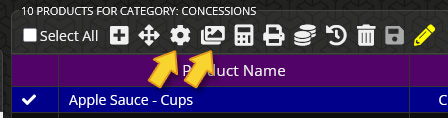
These two features were causing stability issues on our POS server and we have disabled them while we investigate the issue. These two features may be unavailable for a few hours today while work is being done to correct the issue.
The Product Settings button appears on the top of the Products Manager screen after highlighting a product and allows you to configure additional settings related to the chosen product. This includes tasks like changing suppliers for a product and managing barcodes. This issue also affects the product gallery/description feature. This is the “photos” button next to the “gear” (Product Settings) button in the top actions bar while viewing a list of products in any given category.
We will publish a follow-up alert once the issue is resolved.