
This update introduces new reporting tools, pricing enhancements, receipt functionality, and multiple fixes to improve stability and workflow consistency across the system.
Shopify and Order Handling
- Added protection against double-submission of cancellations from Shopify to prevent duplicate actions on Grindless’ side.
Pricing and Trade-In Enhancements
- The Price Changes screen now displays the Online Price when the related item is in stock at any location.
- Since the Online Price is shared across all stores, if a product was out of stock at the primary store, the price change was not presented at the child-store. This change makes it so the online price can be updated even if product is out of stock at the Primary store. Note, you still must approve the change from the Primary store.
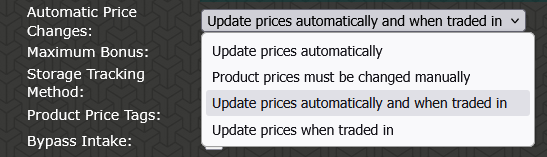
- Added an option to update prices only when items are traded in, providing more control over automatic pricing within trade-in profiles. Find this under Settings > Trade-In Settings > [edit a profile] > Product Settings > “Automatic Price Changes”.
- Additional elements can now be added in the Label Editor, allowing for flexible pricing displays on price tags such as “cash versus card” pricing or “member versus non-member” pricing, for example. This can also reference a Coupon instead, allowing you to configure a coupon and have the system calculate the product’s final price and print that amount on its price tag.
- Currently this feature is only something the Grindless Support Team can add, and it is specific to each store. If you’d like us to add a new label element for your store, please reach out to us by using the Report Problem button on the bottom left of any POS screen. Alternatively, email us at support@grindless.com
Reporting
- Re-introduced the Spiff Report, available under Performance Reports, to support tracking of incentive-based sales or promotions. This was previously removed, as it was seen as redundant because the info is also available on the Shift Report, but some clients reached out and explained its usefulness so we’re bringing it back!
Receipts and Order Lookup
- Added the ability to print a barcode on receipts representing the order ID. To use this, go to Settings > Receipt Designer and edit your receipt footer. In the text box, add this phrase:
{barcode}{ORDERID}{/barcode}
(case sensitive)
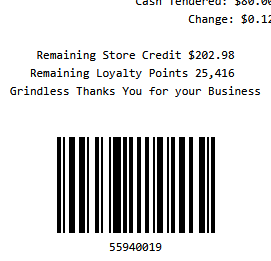
See help topic for Receipt Designer for details. - Receipts can now be scanned with a barcode scanner from Reports > Completed Orders to quickly retrieve the associated order, even if it is from a past date not listed in the table of orders on screen. To scan order barcodes, your barcode scanner either needs to be in SNAPI mode OR it needs to “press” enter after a scan if it’s keyboard mode (or press Enter on your keyboard manually).
Catalog Updates
- Added support for several new card game platforms:
 One Piece
- Digimon
- Star Wars Unlimited
- Dragon Ball Super Fusion World
- Dragon Ball Super Masters
- Pokemon Japan
- Riftbound League of Legends Trading Card Game
- Gundam Card Game
- Funko Pops have been consolidated into a single platform for improved organization. The name of the platform is “Funko POP”.
- If your store was previously taking in Funko Pops as trades, you must enable this new category in your “Default Platforms” in order for Funko Pops to be easily searchable. To do this, go to Settings > Trade-In Settings and scroll down to the list of Platforms shown and enable the “Funko POP” platform.
Bug Fixes
- When importing products (from Settings > Import Products) Fixed an issue where the importing evaluator did not properly validate certain cost fields.
- Resolved an issue where Apply Formula could stall and return an error. This feature is located in Settings > Manage Products and is visible when clicking the action menu (3 dots) on a singular category.
- Corrected duplication of the Trade-In default platform list when creating custom platforms.
- Fixed an issue preventing creation of a System Supplier when no organization phone number was present.
- Resolved an issue where the View ID button on Completed Trade-Ins would open the ID window twice.
This update improves pricing flexibility, reporting capabilities, and overall system reliability, while expanding supported catalog options.