
If you run in-store events at your business, then you’re likely already using Grindless’ built-in Events and Reservations features, but you may not be aware of all of the ins-and-outs of this powerful tool and so we have collected a few tips and tricks for how to get the most out of this feature in the Grindless Point of Sale system.
Using Correct Ticket Types
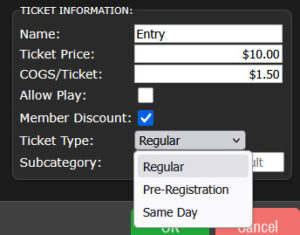 One common mistake we see is that users will setup pre-registration tickets and day-of tickets as both being “Regular” type tickets. While this works, it’s not technically the best way to set things up and there’s a few drawbacks to doing it this way.
If you offer pre-sale/pre-registration tickets to your customers at a special discounted rate to encourage them to commit to attending your event, then make sure you create two tickets for your event; one pre-registration ticket and one day-of instead of creating both as “regular”.
The POS will show only pre-reg tickets to employees when making a sale prior to the day of the event. Then, when the day of the event arrives, it will switch to showing day-of tickets instead. This prevents employees from accidentally choosing the wrong one while they’re ringing up the customer.
Ticket Quantity Limits
When creating an in-store event, don’t forget to set a ticket quantity limit. If your space holds 24 players, set the ticket quantity to 24 to avoid over-selling. Once those tickets are sold and the event is sold out, the system will prevent accidental overbooking and the awkward “sorry, we’re full” conversations on event night.
Seat Assignment
Make event day smoother by assigning seats at the time of ticket purchase. When a customer buys a ticket, your staff can immediately select their seat in the store. This makes it easy to:
- Seat friends next to each other
- Separate age groups if needed
- Organize pods, tables, or tournament sections in advance
- Reduce confusion and crowding before the event begins
Instead of sorting everything out when players arrive, your seating chart is already planned and ready to go.
Online Events Calendar
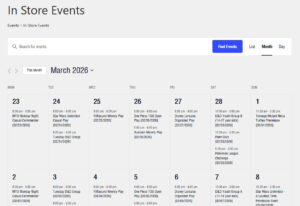 Is your store showing your events calendar on your website? If not, we can help you set this up! You can display a calendar of your store’s events online, with events being automatically synchronized from the point of sale.
Simply publish your events in the system as usual, and your events will begin appearing online.
Your customers can also subscribe to your events calendar so that events automatically sync to their smartphones and appear on their calendars to help them keep in-the-know about what’s going on in your store and when. This not only helps increase revenue via ticket sales, but it also helps your events become more active and lively by boosting attendance. The more people that show up, the more fun and engaging it is for everyone there.
We’re Here To Help!
If you have questions about features in the POS or have feedback about any of our help topics, submit your questions from the POS by using the “Report Problem” button (and choosing Question as the type) or send us an email at support@grindless.com.